Mastodon Verification

Help logging into my Facebook account

Bud Buchsbaum

Sprue Snipper
HLI Supporter
It's been some time since I used Facebook. I've been trying and trying to log back into my account but for the life of me I can't. When I try to login It's sending a passcode to an old phone number that I don't use or have that phone anymore or it says get code from another device which does not work. Ive tried everything I could think of to log back in but nothing works.


Does anybody have any ideas how I can recover my old account?


Thanks
 
To be honest you are better off without it. I know that doesn't help (Sorry) but it is a truth we should all take to heart. Facebook is like the Cantina in Star Wars: "Facebook, You will never find a more wretched hive of scum and villainy. We must be cautious."
 
It's been some time since I used Facebook. I've been trying and trying to log back into my account but for the life of me I can't. When I try to login It's sending a passcode to an old phone number that I don't use or have that phone anymore or it says get code from another device which does not work. Ive tried everything I could think of to log back in but nothing works.


Does anybody have any ideas how I can recover my old account?


Thanks

Bud,

Try looking anywhere on the login pages for a link saying something like:

"No longer have access to these?"

It may or may not be there and if it is, it might give you another non-standard way to log in.

Facebook tells me your username is misfitscalemodeler

If you can try logging in with that username instead of an email or phone, it could give you another way.

Also check to see if you ever saved a set of Recovery Codes someplace. They're meant for situations like this.

That's all i have for now.

Spencer
 
To be honest you are better off without it. I know that doesn't help (Sorry) but it is a truth we should all take to heart. Facebook is like the Cantina in Star Wars: "Facebook, You will never find a more wretched hive of scum and villainy. We must be cautious."
Believe me, I understand were your coming from. But I have some friends I would like to get in contact with again.
 
Bud,

Try looking anywhere on the login pages for a link saying something like:

"No longer have access to these?"

It may or may not be there and if it is, it might give you another non-standard way to log in.

Facebook tells me your username is misfitscalemodeler

If you can try logging in with that username instead of an email or phone, it could give you another way.

Also check to see if you ever saved a set of Recovery Codes someplace. They're meant for situations like this.

That's all i have for now.

Spencer
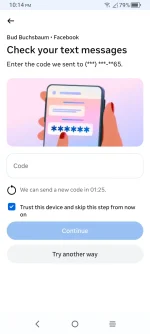
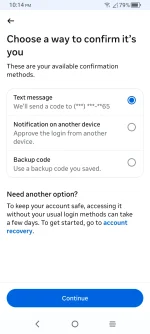
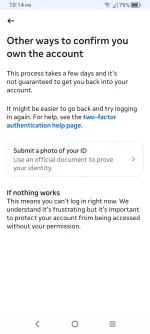
Hay Spencer, I've tried everything. Here are some screenshots so you see where I'm at. I've done everything on these pages except for the license ID cuz my license is out of date but I never put my license ID in there for verification. I don't know what to do next. I don't have that phone number anymore.
 

Attachments

  • Screenshot_20260319-221431.webp
    Screenshot_20260319-221431.webp
    38.3 KB · Views: 2
  • Screenshot_20260319-221438.webp
    Screenshot_20260319-221438.webp
    53.7 KB · Views: 2
  • Screenshot_20260319-221447.webp
    Screenshot_20260319-221447.webp
    61.7 KB · Views: 2
Maybe this will help...


First, try this link​

You may be able to recover your account by visiting facebook.com/hacked, even if you’re not sure whether your account was compromised.

If that didn't work, try these steps​

If you don’t have access to the email address or mobile phone number associated with your Facebook account — maybe because you were hacked and your password was changed, or you lost or forgot them — try these steps to recover your account:

  • Try using a different mobile phone number or email address, which you might have forgotten are associated with your account.
  • Double check that you’ve entered your mobile phone number or email correctly at login. If you’re entering a mobile phone number, try including the country code. For example, +1 is the United States country code.
  • Try contacting your email provider to see if they can help you recover access to your email account.

If that worked, follow the steps to reset your password.

Find your account on a familiar device​

Important: This next part is most helpful if you can use a device you’ve used to log into Facebook before. This might be your own phone or computer, or it could be an old phone or a family member’s laptop. If you can get access to that device, try these steps:

  1. On a device you’ve used to log in before, type this into your usual browser: facebook.com/login/identify
  2. Enter an email address or a mobile phone number. It can be the one you usually use to log in, or any other that you think could be registered to the account.
  3. If that doesn’t work, try entering your account name or username. If you don't know your username, you could ask a friend to go to your profile and send you the username found in the URL:
    453608249_500556375991295_9066182135864679573_n.png

Get more help finding your Facebook account.

Steps to follow after finding your account​


  1. Select No longer have access to these? If you can’t see this, you might see Forgot account? or Recover instead.
  2. Follow the prompts. You may be asked to provide new contact information. The contact information you provide must not have been used for your Facebook account before.
  3. Follow the prompts to confirm that the account you’re trying to recover belongs to you.
  4. Once you have successfully passed all the security checks, follow the instructions to reset your password. Try to choose something that is easy for you to remember, but hard for other people to guess.
 
Thanks Veedubb67, I've tried all that and it just keeps sending me back to the first page where it's sending a code to a phone number I don't have anymore but good news is I made another account under my name " Bud Buchsbaum " so at least that's something but I do appreciate all the information you posted here. And anybody is more than welcome to friend request me.
 

Star Trek 60th Anniversary GB

Halloween Group Build 2026

The 2026 Christmas GB

Back
Top