

I have adjusted the size of thumbnails to make reading posts easier for us all. To further assist our members on how to place thumbnails in your post just follow along on this tutorial.
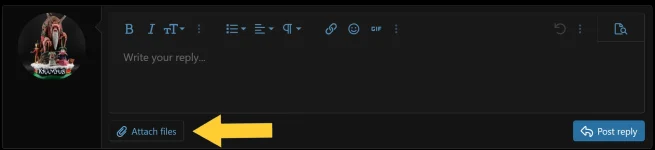
First at the bottom of the page click on the attach files button.
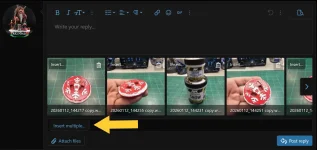
This will open up your computers files. Choose the photos you want to put in your post and hit open. Once they are imported into the forum click on the insert multiple button.
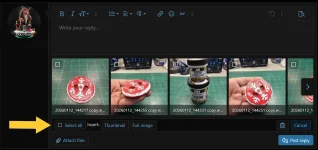
After you click on the insert multiple button a new menu will pop up prompting you to select more. Click on that button if you want to insert all of the pictures at once. It will put a check mark on every photo for you.

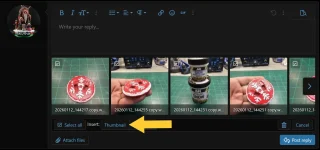
Once you have selected the number of photos you want to put in your post click the thumbnail button. This makes it so the thumbnail images are 150 px and keeps the post easy to read. All the photos can still be clicked on inside the post and will be the original size after being clicked to view.
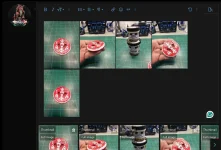
Then as usual just hit the post button and your post will be added to the thread.
If you are adding say a sentence to explain a technique and want to upload one or two photos at a time do the same procedure but inside the picture itself after hitting insert multiple button you can choose single photos hit the insert button in the photo and choose thumbnail.
If you have any questions please feel free to reach out to us.
First at the bottom of the page click on the attach files button.
This will open up your computers files. Choose the photos you want to put in your post and hit open. Once they are imported into the forum click on the insert multiple button.
After you click on the insert multiple button a new menu will pop up prompting you to select more. Click on that button if you want to insert all of the pictures at once. It will put a check mark on every photo for you.
Once you have selected the number of photos you want to put in your post click the thumbnail button. This makes it so the thumbnail images are 150 px and keeps the post easy to read. All the photos can still be clicked on inside the post and will be the original size after being clicked to view.
Then as usual just hit the post button and your post will be added to the thread.
If you are adding say a sentence to explain a technique and want to upload one or two photos at a time do the same procedure but inside the picture itself after hitting insert multiple button you can choose single photos hit the insert button in the photo and choose thumbnail.
If you have any questions please feel free to reach out to us.


